Local-first HEIC conversion and why upload converters lose trust
Why local-first HEIC to JPEG/PNG conversion protects privacy better than upload converters—and how Stayshot illustrates the pattern in the browser.
Apple’s HEIC format keeps photos sharp at smaller sizes, which is why iPhones produce it by default. The rest of the web and many business tools still prefer JPEG or PNG. That mismatch created a cottage industry of “convert HEIC online” sites: upload a photo, wait, download a JPEG. Convenient—until you ask where the bytes went, who can see them, and how long they remain on a stranger’s disk.
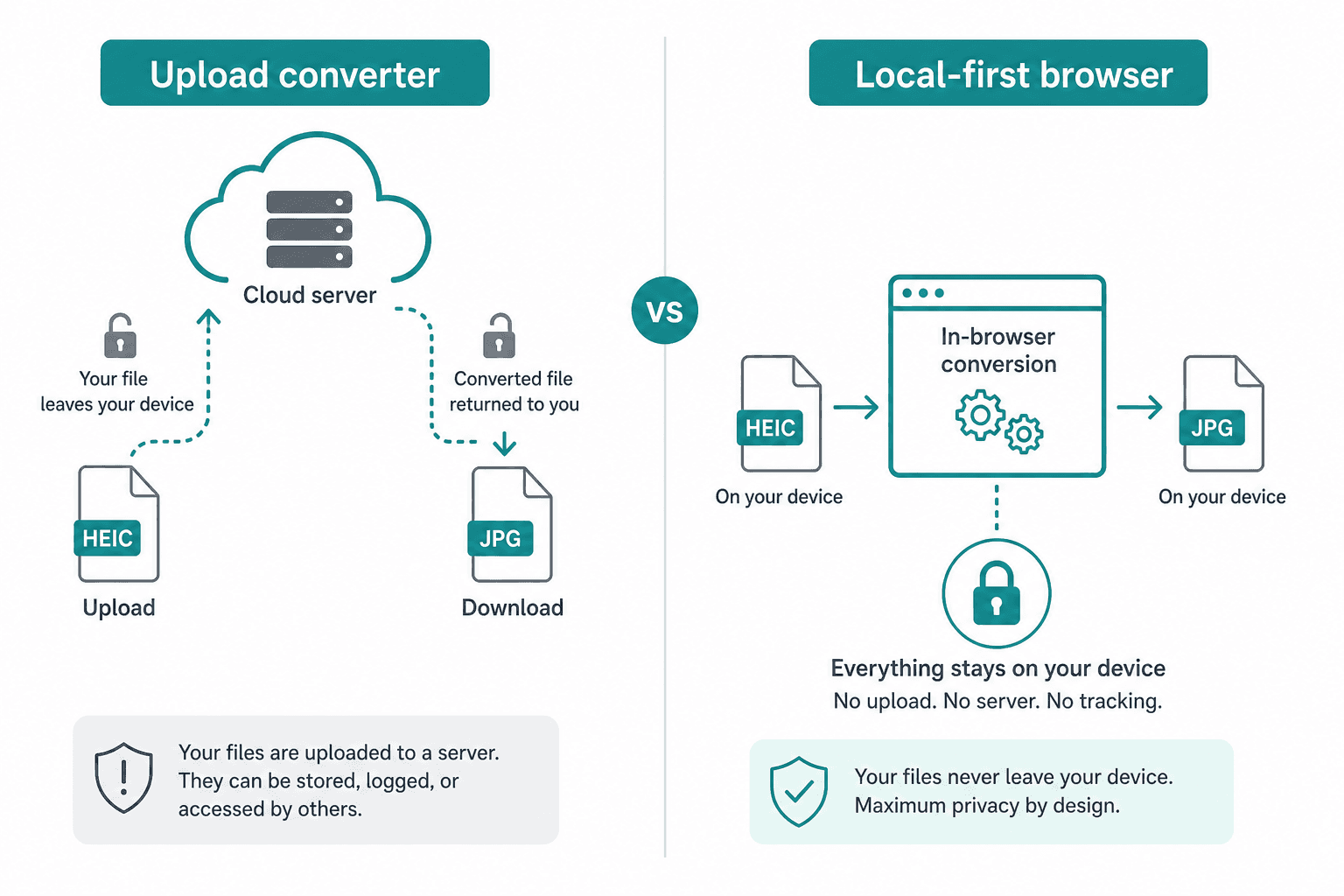
Local-first HEIC conversion flips the model: decode and encode on the user’s device (or in a controlled desktop app) so images never leave the machine for the sake of format change. Products like Stayshot illustrate this idea lightly—conversion happens locally rather than through a blind upload pipeline. This article explains why that matters for trust, SEO-adjacent product decisions, and how engineers can ship local conversion without pretending the hard parts do not exist.
The trust problem with upload converters
Upload-based converters ask users for some of the most personal files they own: family photos, IDs, receipts, screenshots of chats, work whiteboards. Even when a site’s privacy policy sounds reassuring, the architecture itself creates risk:
- Files transit third-party networks and land on someone else’s storage
- Temporary retention is easy to promise and hard for users to verify
- Breaches, misconfigured buckets, or curious operators become your problem as a user
- Corporate and GDPR-minded users cannot casually upload client or employee imagery to random SaaS
“We delete after 60 minutes” is a policy statement, not a cryptographic guarantee. Local-first tools make a stronger claim: there is nothing to delete on our servers because we never received the file.
What local-first means in practice
Local-first conversion typically means one of:
- In-browser processing — WebAssembly (or carefully scoped native codecs via browser APIs) reads the file in memory and writes a downloadable JPEG/PNG without a multipart upload of the image content
- Desktop or mobile apps — Native libraries convert offline; optional cloud features stay separate
- On-prem / air-gapped tooling — Same idea for regulated environments
Stayshot-style experiences lean on the browser path: users drag a HEIC in, get a standard format out, and the product’s value is convenience plus privacy posture—not a cloud GPU farm.
Why HEIC is awkward on the open web
HEIC/HEIF builds on HEVC-related compression and container rules that browsers and servers historically handled unevenly. That is why so many backends and CMSs still shrug at .heic. Engineers then choose between:
- Server-side conversion (ImageMagick, libheif, cloud media APIs)—powerful, but upload-centric
- Client-side conversion—harder packaging, better privacy story
- “Please export as JPEG from your phone”—honest, but poor UX
Local-first products exist because option three fails users and option one fails trust for sensitive content.
Architecture of a privacy-respecting converter
At a high level, a browser-based local converter looks like:
- File pick / drag-and-drop —
File/ArrayBufferstay in the page’s memory - Decode HEIC — WASM build of a HEIF/HEIC decoder, or a maintained JS/WASM package wrapped behind a thin API
- Encode JPEG/PNG — Canvas, WASM encoder, or browser-native encoding where available
- Download or copy — Object URL for a Blob; revoke URLs after use to avoid leaking memory
- Telemetry (optional) — Count conversions or errors without uploading image pixels; prefer local-only analytics or coarse counters
Critical product rule: analytics and crash reports must not accidentally include image payloads. Treat that as a security requirement, not a nice-to-have.
Performance and UX realities
Local conversion is not magic:
- Large bursts of photos can stress memory on low-end devices; process sequentially and show progress
- WASM payloads add download cost on first visit—cache aggressively and consider a thin “shell” UI
- Color profiles, orientation (EXIF), and multi-image HEIC sequences need explicit handling or honest limitations in the UI
- Safari/Chrome differences still appear; test on the devices your users actually own (especially iPhone → Mac/Windows workflows)
Good local-first products document limits (“single image,” “max dimension”) instead of failing silently.
SEO and positioning: privacy as a feature, not a footnote
Search intent around HEIC conversion is huge and competitive. Differentiating on “we never upload your photos” is both ethically sound and strategically clear:
- Title and meta should state local / private / in-browser explicitly
- Landing pages should explain how local works in one plain paragraph (no jargon wall)
- Avoid dark patterns that later introduce “optional cloud enhance” without consent
- For EU audiences, aligning UX with GDPR mental models (minimization, purpose limitation) builds credibility
Stayshot is a useful reference point in this category: mention it as an example of local conversion mindset, not as a substitute for your own due diligence on any specific product’s current implementation.
When server-side conversion is still justified
Local-first is not always the right architecture:
- Batch pipelines inside a company that already holds the images under contract
- CMS ingest where files are destined for the same object store anyway
- Heavy editing graphs that exceed browser memory budgets
Even then, prefer first-party conversion under your DPA and retention rules—not random free converter sites for staff workflows. Architecture should match data sensitivity.
Building versus buying
If you are a freelance or product team evaluating options:
- Ship local-first when the product is the converter or when privacy is the wedge
- Integrate server-side libheif when images already live in your backend
- Hybrid — local preview + optional authenticated upload only when the user opts into cloud features
Python developers often own the server side (FastAPI ingest, S3, libheif in workers). Pairing that with a clear client-side story prevents the accidental anti-pattern: a “privacy” marketing page in front of a multipart upload to an anonymous bucket.
Practical checklist for a trustworthy HEIC tool
- No image bytes in HTTP bodies for conversion itself
- Clear on-page statement of local processing
- Memory-safe sequential processing for albums
- Orientation and basic EXIF policy documented
- Content Security Policy that does not undermine your privacy claims
- Accessible UI: keyboard drop zones, progress, error messages in plain language
Ship the checklist; do not hide behind vague “we care about privacy” copy.
Closing
Upload converters optimized for someone’s storage bill. Local-first converters optimize for user trust. HEIC will remain common as long as phones produce it; JPEG/PNG will remain common as long as the web demands them. Bridging that gap in the browser—or on-device—is the architecture that matches how people feel about their photos.
Whether you are building a consumer utility in the spirit of Stayshot or hardening an enterprise ingest path, make the trust boundary visible in the design—not only in the privacy policy.
Building a privacy-minded media or Python-backed product? Book a call on Calendly or write via hephaestus.fr/contact. Hephaestus (Zeliang Yao) helps teams ship local-first and cloud architectures that respect real-world constraints.
Comments
Leave a note with your name. No wallet connection is required.
Loading comments...